


Hacker News
4.02.00 Reviews
App Specs
- Version
- 1.0.6
- Updated On
- License
- Free
- Downloads
- 10,000+
- Developer
- Emerge Tools
- Categories
- News & Magazines
- Platform
- Android
Screenshots
 Analysis by AppCompare
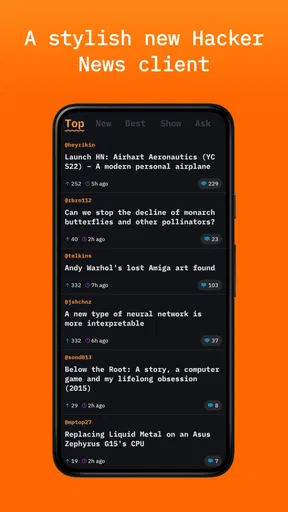
Hacker News is the kind of app I open when I want to follow technology without being pulled into a noisy social feed. Developed by Emerge Tools, this free News & Magazines app gives me a focused way to browse the Hacker News community on a phone. Its appeal is not visual spectacle; it is the ability to move through technical links, discussions, and comments with very little between me and the material.
After spending time with it, I see Hacker News as a compact reading tool for people who already understand what Hacker News is and want a cleaner mobile routine. It is currently at version 1.0.6, has a 4.0 average from around 33 ratings, and has passed 10K installs. Those figures suggest a small but real audience rather than a mass-market news product. The app is free, carries an Everyone 10+ content rating, and requires iOS 11 or later.
How I use Hacker News in an everyday reading routine
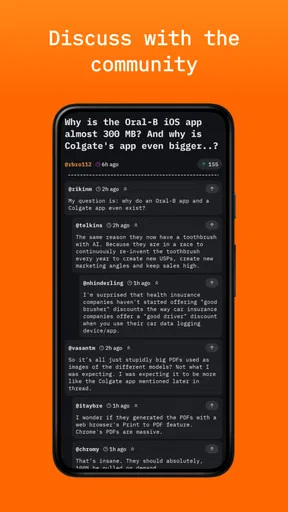
My baseline workflow is simple: I open the app, scan the current list, stop at headlines that match my interests, and then decide whether I want the linked article or the Hacker News discussion. That distinction matters. Many news readers treat the headline as the whole experience, while Hacker News is often most valuable in the comments, where developers challenge assumptions, add technical context, or point out details that the original article skips.
The app works best when I treat it as a deliberate reading queue rather than an endless news stream. I usually scan first without opening everything. A headline about a programming tool, infrastructure change, security issue, or unusual engineering decision gets a closer look. Less relevant items can be ignored immediately, which keeps the session short and prevents the app from becoming another source of passive scrolling.
A realistic example is a weekday commute or a short break between tasks. I might have five minutes, so I read headlines first and open only one discussion. If the linked page is dense, I return to the conversation instead of trying to finish the entire article. That makes the app useful even when I do not have enough time for a full research session. The value comes from choosing intelligently, not from consuming every item.
The reader is especially suitable for people who enjoy technical subjects but do not want a general-purpose news app mixing them with celebrity stories, shopping recommendations, or unrelated breaking news. It is also useful for developers who want to notice recurring conversations: programming language design, open-source maintenance, product decisions, privacy, startup economics, and the practical consequences of new tools.
I would not recommend it as a replacement for a broad news service. It is not the app I would open to catch up on local reporting, world events, sports, or a balanced range of mainstream publications. Its identity is tied closely to Hacker News, and that narrow focus is both its strongest quality and its clearest boundary.
Worth Reading Before You Choose

EA SPORTS FC Mobile 26 Is a Bigger Football Game, but It Takes Time

Flipboard Shows What News Apps Must Do Beyond the Feed

Switching to Android Auto Means Rethinking Your Driving Routine

Google Calendar Makes a Crowded Week Easier to Manage

Ludo King Makes the Most of the Minutes Between Plans

Baby Panda World Brings Quick Play to Modern Phones, but Its Game Library Feels Busy
What makes the focused format useful
The uncluttered subject matter changes how I read. I am less likely to skim a headline simply because it is emotionally provocative, and more likely to ask whether the linked material is technically useful or whether the discussion adds something meaningful. That does not eliminate noise—Hacker News discussions can still become repetitive or opinionated—but the app keeps the center of attention on the community’s submissions and responses.
One useful habit is to separate discovery from evaluation. On the first pass, I look for topics worth opening. On the second, I judge the quality of the discussion. A highly visible item is not automatically the most informative one, and a modest-looking headline can lead to a thoughtful exchange. This two-pass approach is more effective than treating the top of the list as a guarantee of importance.
Another practical habit is to read comments with a specific question in mind. Instead of asking whether a thread is “good,” I look for evidence, alternative explanations, implementation details, or links to primary material. That makes the app more valuable for learning and less likely to become a stream of loosely connected opinions.
Settings and small choices worth checking
Because this is a focused reader rather than a feature-heavy media platform, I do not approach it expecting a large control panel. The important settings are the ones that affect how comfortably I browse and how much attention I give each session. I check the available reading and navigation preferences early, then keep only the choices that make returning to the app easier.
My main recommendation is to adjust the experience for the way you actually read. If you prefer quick scanning, keep navigation direct and avoid building a complicated routine around every item. If you read discussions carefully, make sure the text presentation feels comfortable for longer comment threads. A setting is useful only when it removes friction; changing options for the sake of customization can make a small app feel more complicated than it needs to be.
I also pay attention to how I handle external articles. A Hacker News reader is partly a doorway to other websites, and those pages can have very different layouts, tracking practices, paywalls, or mobile behavior. When I only want the community’s reaction, I stay with the discussion. When I need the original technical details, I open the linked page and treat it as a separate reading task.
This is an important trade-off for new users. The app can organize access to Hacker News, but it cannot make every linked publication equally pleasant. A clean thread may lead to a cluttered article, while a difficult article may contain the information needed to understand the comments. I decide which side deserves my time instead of blaming the reader when an external page is awkward.
I also suggest creating a repeatable stopping point. For me, that means ending a session after a small selection of worthwhile threads rather than continuing until the list feels exhausted. This prevents the app from competing with work or sleep and makes it easier to return later with genuine curiosity. The best setting is often a personal rule about attention rather than a switch inside the app.
Faster patterns for experienced readers
Once the basic routine feels natural, speed comes from consistent choices. I scan the headline, identify whether the link itself or the comments are likely to matter, and open the most promising path first. If a thread has already answered my question, I leave it. If the discussion is mostly repetition, I move on. This sounds obvious, but applying it consistently makes a noticeable difference to a short mobile session.
I find it helpful to classify items mentally into three groups: something to read now, something to inspect later, and something to skip. The app becomes more useful when I do not force every headline into the first group. A technical article may be valuable but unsuitable for a five-minute break. Recognizing that distinction keeps quick browsing from turning into unfinished reading everywhere else.
Another advanced but simple workflow is to compare the headline with the discussion before forming an opinion. The title may promise a breakthrough, while the comments reveal a narrower result. Conversely, a dry title may lead to a detailed explanation with practical lessons. Reading both sides protects me from relying on the headline alone and is one of the main reasons I prefer a Hacker News reader to a conventional headline aggregator for technical topics.
For recurring interests, I use a lightweight habit rather than expecting the app to do all the organization. I note subjects that repeatedly catch my attention—such as language tooling, database design, or independent software—and use those themes to guide future scanning. This is more flexible than waiting for a perfect personalized feed, because it lets me follow changing interests without locking the experience into a narrow filter.
Shortcuts can help when the platform makes them available through normal system navigation, but I would not build my entire workflow around imagined power-user controls. The reliable advantage here is fast access to the Hacker News reading experience, not an elaborate productivity system. I get better results by learning the app’s ordinary navigation and pairing it with a clear reading method.
Where the app reaches its limits
The focused design also means I notice what the app is not trying to be. It does not replace a full RSS reader when I want to combine many independent sites into one custom publication list. An RSS app is better for controlling sources directly, following specialist blogs, and keeping a broader archive of articles. Hacker News is better when I want the community layer around selected technology links.
It is also different from a general social platform. I do not use it to maintain personal connections, share everyday updates, or receive a wide range of personalized recommendations. The conversation is attached to submitted stories, so the experience depends heavily on what has been posted and how the discussion develops. On a slow day, there may simply be fewer items that deserve my attention.
Readers who dislike technical jargon may find the app demanding. Even when a headline looks accessible, the comments can assume familiarity with programming, systems, business models, or internet culture. I would skip it if my main goal were relaxed, general-interest reading. The content is not necessarily inaccessible, but the best experience comes from being comfortable learning through context and disagreement.
There is another limitation in the relationship between speed and depth. A quick scan is easy, but understanding a serious thread may require opening multiple links, checking the original source, and separating informed criticism from confident speculation. The app can start that process very well; it cannot perform the evaluation for me. I still need to judge sources and avoid treating popularity as proof.
The small audience size reflected by its current rating activity also makes me view the project as a focused tool rather than an established all-purpose platform. That is not a criticism of Emerge Tools, but it shapes my expectations. I would install it because its purpose fits my reading habits, not because I need a huge ecosystem of services around it.
Privacy-conscious readers may appreciate the open-source positioning in the app’s description, but I still recommend checking the app’s current behavior and permissions on the device before making assumptions. Open source can improve transparency, yet it does not automatically make every linked website private or every browsing session anonymous. The practical privacy picture includes the external pages I choose to open.
Who should install it and who should choose something else
I think it is a good choice for a developer, student, technical founder, researcher, or curious reader who already likes Hacker News and wants a dedicated mobile entry point. It is particularly appealing if you value discussions as much as articles and prefer a compact interface over a magazine-style presentation.
I would point a casual news reader toward a broader app instead. If you want local headlines, international coverage, newsletters, saved articles from many publishers, or strong editorial organization, a general news reader or RSS client will probably serve you better. If you mainly want to read long articles offline, an app designed around article saving and offline storage may also be a better fit.
The free price lowers the barrier to trying it, and the Everyone 10+ rating makes it suitable for a wide audience, though the subject matter can still be more specialized than that label suggests. I would install it, spend a few sessions using the scan-and-select workflow, and keep it only if the discussions consistently teach me something or help me discover worthwhile technical writing.
My verdict after building a repeatable routine
What I like most about Hacker News is its restraint. It gives me a direct way to browse a particular technical community without pretending to be a complete news service. The best results come from combining the app with habits: scan before opening, distinguish the article from the discussion, verify strong claims, and stop when the useful material is finished.
Its limitations are equally clear. It depends on the quality and relevance of Hacker News submissions, sends me to external pages with their own problems, and may feel too specialized for anyone seeking broad daily news. It also rewards active judgment rather than passive consumption, which some readers will find refreshing and others will find tiring.
For my own use, that trade-off works. I would keep Hacker News installed as a focused technical reading companion, not as my only news app. If you enjoy thoughtful engineering conversations and want a free, open-source-oriented reader from Emerge Tools, it is worth trying. Just approach it with a clear routine: use it to discover and understand discussions, then choose another tool when you need wider coverage, deeper personal organization, or a polished all-purpose news experience.
Pros
- Clean
- distraction-free interface focused on tech news and discussions.
- Fast loading makes it easy to browse posts on slower connections.
- No account is required to read articles and follow discussions.
- Comment threads often provide useful technical insights and expert opinions.
- Available across platforms through several reliable third-party clients.
Cons
- The ranking system can make newer or less popular stories hard to discover.
- Discussions may be highly technical and difficult for casual readers to follow.
- Some comment sections contain blunt
- dismissive
- or unfriendly replies.
- The official mobile experience is limited compared with dedicated third-party apps.
- External article quality varies
- and some links may be outdated or inaccessible.
FAQs for Hacker News
What is Hacker News, and what can I do with it?
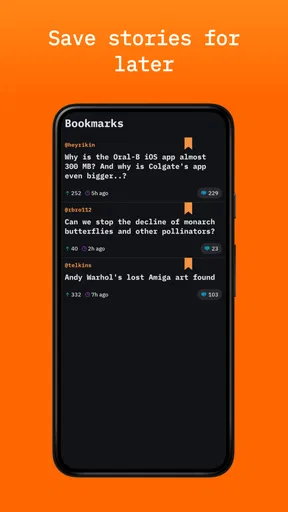
Hacker News is a technology-focused news and discussion platform operated by Y Combinator. It features links and original posts about programming, startups, artificial intelligence, cybersecurity, science, and related topics. After installing a compatible Hacker News app, you can browse ranked stories, open linked articles, read comments, vote, and often save or share posts, depending on the app’s available features.
Is the Hacker News app official, and which version should I download?
The official Hacker News service is available through the website news.ycombinator.com, while mobile applications may be independently developed clients rather than official Y Combinator products. Before downloading, check the developer name, recent update history, permissions, reviews, and privacy policy. Make sure the application clearly explains whether it connects to Hacker News directly and whether it requires your account credentials.
Do I need a Hacker News account to read stories and comments?
Usually, you can browse Hacker News stories, open external links, and read discussions without creating an account. An account is generally needed for interactive actions such as submitting posts, commenting, voting, favoriting, or managing personal settings. Some third-party apps may offer limited guest access or require you to sign in before displaying certain features, so the exact experience can vary.
Does Hacker News contain advertisements or require a subscription?
The Hacker News website itself is generally known for its simple interface and does not operate like a conventional ad-heavy news application. However, third-party mobile clients may include advertisements, optional purchases, donations, or premium features. The articles linked from Hacker News can also belong to publishers that use paywalls or subscriptions, meaning access to the discussion does not always guarantee free access to the complete linked article.
Is Hacker News suitable for beginners, and what should I know about its discussions?
Hacker News can be useful for beginners interested in technology, but many discussions assume familiarity with software development, startups, economics, or online culture. Comments may be technical, strongly opinionated, or critical, and the community has its own moderation standards and etiquette. Readers should evaluate claims carefully, follow source links, and remember that highly ranked comments are not automatically accurate or universally accepted.


